The plumbing for profitable Google Ads
Track WhatsApp leads, qualified leads and sales. Optimise your campaigns for valuable business outcomes instead of random button clicks.
Google Ads can track a click on a WhatsApp button easily. So many businesses optimise for clicks on the WhatsApp button.
But here's a thing. Google learns from the data you give it. If you feed Google button clicks, it will optimise for button clicks. You end up paying for clicks, not necessarily clicks that turn into leads and sales.
A while ago we looked at a few days of data. Our users tracked 70,829 WhatsApp button clicks, but of those only 4,807 resulted in a WhatsApp message.
The rest? Bots, spammers, curiosity clicks. Who knows? They just weren't leads or sales.
And that's a problem. If click-on-a-button is your primary conversion action, most of the data Google is using probably doesn't represent real leads.
You can see which keywords generate leads. You can see which leads become customers. You can see which campaigns generate revenue.
Instead of optimising for clicks, you optimise for profit.
Instead of guessing, you know.
That means better decisions, better campaigns and better use of your advertising budget.
Setup takes a few minutes. Add one line of Javascript to your website template or tag manager. This gives your WhatsApp links and buttons superpowers.
Convertista adds a unique reference to every visitor who clicks your WhatsApp button. (Click the WhatsApp widget on this page to see what it looks like.)
That reference links the visitor to the original click from your ads with all the tracking parameters you set.
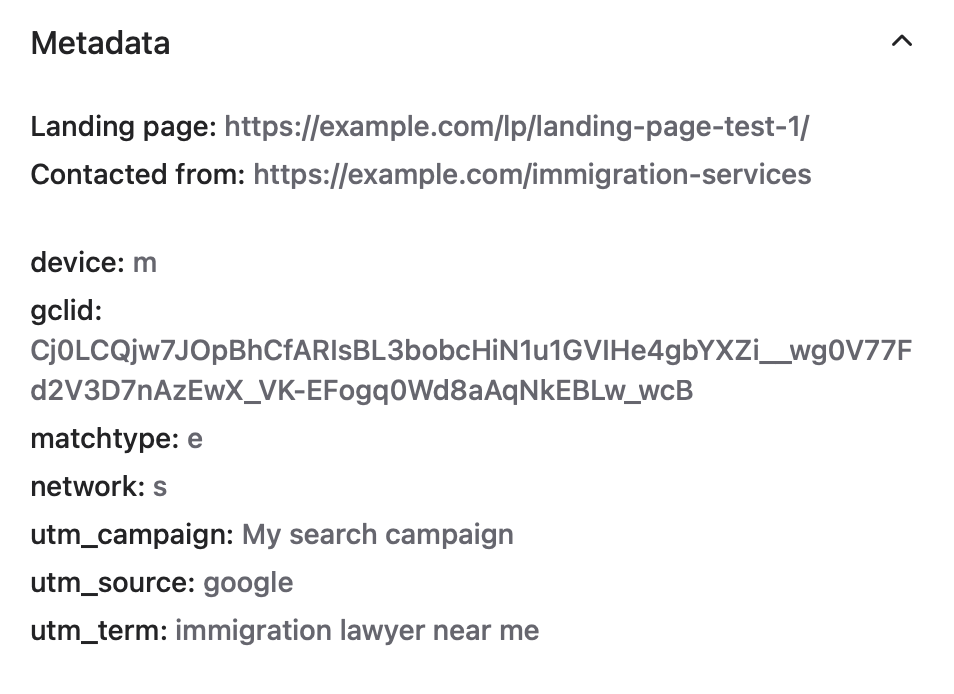
Update the lead when they make send a message, are qualified or contract with the business.
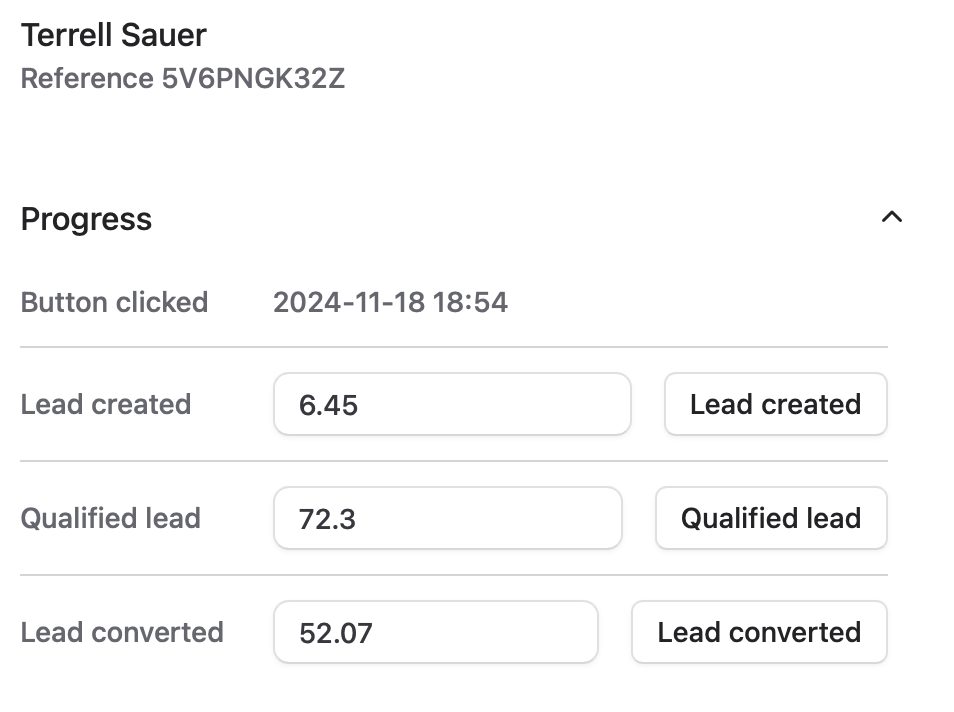
Convertista automatically uploads your conversion data to Google Ads using the Data Manager. There is no messing around with spreadsheets or CSV files.
You can now optimise your campaign for leads, qualified leads, sales or revenue. Whichever you prefer.
No. No tracking system can guarantee 100% attribution.
But, tracking doesn't have to be perfect to get better ROI than optimising for clicks only.
Yes. Conversions are uploaded automatically. There is no need to download spreadsheets or manually import conversion data.
For most businesses, we recommend tracking three stages after the button click:
This gives you and Google insight into how your ads are performing.
Most of the time only one of these conversions is set to primary. The rest are set to secondary for observation. The right setup for your business depends on several factors. We're happy to help.
No. Button clicked conversions are tracked automatically.
Messages received (lead created), qualified leads and sales can be updated manually in Convertista. Where lead volume is high it can be automated through our API.
Yes and no.
Convertista can track leads from any traffic source. Many customers use it to understand the value of leads generated by Google Ads, Facebook Ads, organic search and email campaigns.
But Convertista can only upload conversions to Google automatically. You can download data from Convertista if you need to upload it to other platforms.
No. Convertista works with any WhatsApp number.
Yes.
Convertista can work alongside WATI and other WhatsApp management platforms.
We'll help you configure the most reliable setup for your environment.
Every website or landing page is slightly different. Normally it takes just a few minutes to set up, but we want to make sure that everything is working correctly so you're feeding clean and complete data to Google.
We'll work with you to verify the installation, set up the conversion tracking and, if you want, help you choose the right conversion settings.
You probably could. I guess you could vibe-code something like this in a week or so.
Building the software isn't the hard part. The challenge is making it accurate, reliable and worth trusting with your advertising data for the next few years.
Convertista is the result of almost 20 years Google Ads experience, hundreds of thousands of tracked WhatsApp leads, real-world testing, ongoing maintenance and continuous refinement.
I guess it comes down to one question: Is maintaining tracking software, really the best use of your time?
Every account includes concierge onboarding and a 60-day money-back guarantee.
Every website is different. Some websites need a few minutes of setup. Others need custom work to make sure tracking is accurate and reliable. That's why every Convertista account includes concierge onboarding.
We'll help you install the tracking, verify that it's working correctly and connect your Google Ads account.
Send a WhatsApp message using the widget on this page. I'll do my best to answer any questions you have.
You'll need:
